SmartSleep

May 8th, 2008 7:33 pm

SmartSleep is one of those “I wish I knew about this earlier” pieces of software that saves me several minutes every day when I put my MacBook Pro to sleep. Intel Mac laptops (and some of the late G4 laptops) have three sleep states: basic sleep, sleep and hibernate, and full-on hibernate. Sleep is the basic low-power mode, and hibernate actually writes the contents of RAM to disk to conserve even more battery power and prevent the contents of RAM from being lost in the event of a power outage. By default, Intel Macs do the latter, and spend 20 to 60 seconds dumping RAM to disk before going to sleep, depending on how much RAM you have installed. If you happen to run your Mac on AC power most of the time, waiting for the disk to spin down can feel like minutes, but SmartSleep lets you safely switch between sleep modes. After setting my MacBook Pro to sleep only, it blinks off and spins down in only a second or two — a huge improvement in sleep time. This “feature” has been bugging me for the last several months, and SmartSleep quickly and effectively adds the system preference that Apple forgot.

Two Weeks with Coda

April 15th, 2008 6:54 pm

One Window is More
Two weeks ago I finally decided to give Panic’s newest Mac OS X offering, Coda, a thorough test to see if will better serve my web development needs. I had known about it since its initial release, hailed by many as the perfect solution to web developers needs, while downplayed by some due to lack of features. Coda is an 80% solution — an application that tries to simplify the average coder’s workflow, unifying the standard multi-program arrangement into one window, with configurable tabs for various purposes. Panic won’t win everyone over with this tactic, but the idea of opening a single, dedicated program to do my work in really appealed to me both as a designer and a programmer. Coda’s icon, a simple green leaf, subtly hints “keep it simple” at every launch. Panic’s developers have taken this approach to heart, crafting a straightforward interface which rivals that of the best Mac applications.

One week ago, I purchased Coda. No, it doesn’t have Subversion support. No, it doesn’t have fullscreen mode. What I did find, though, is a unique application that neatly organizes most of the tools I need to get web development done. A syntax-completing text editor, visual or textual CSS editor, terminal, and live web preview are among my most used tools, any of which can be swapped for another, or split into multiple views. With my preferred syntax coloring set up, Coda’s split tabs make me feel right at home, editing HTML and CSS side by side with a preview of the results just a click away.

Get Back to Work
Coda makes getting back into “the zone” really quite easy with its Sites feature, which keeps track of each project’s tab arrangement, FTP settings, public URL, and more. Double-click a Site to start working right where you left off. As for publishing, Coda leverages Transmit’s FTP engine, which keeps folders in sync between your computer and web host with little effort.

A Few Shortcomings
I often work with MySQL as my data store and use CocoaMySQL as a front-end, but switching applications goes against the one-window flow that Coda tries so hard to bring together, so I installed phpMyAdmin and just use it inside a Preview tab within Coda — couldn’t be simpler. The same goes for online documentation not covered by the built-in PHP and JavaScript references. For Subversion, I’ll just use command-line ’svn’ calls within a Terminal mode, as it’s surprisingly straightforward for a command-line utility.

Only the Beginning
As of this writing, Coda is just at version 1.1, so there’s plenty of room for it to grow (pun intended). At the very least, I hope to see fullscreen mode similar to NetNewsWire’s in the near future, so I can really get into my code and ignore little distractions like menu bar extras, Mail badges, etc. Panic has dropped their biggest application yet on the Mac web developer community, and overall, I’m very satisfied with Coda and am getting so much more done in so fewer windows.

Extra Goodies
Panic engineer Steven Frank posted some little Made with Coda web badges I made on his site. If you enjoy using Coda, share the love.

Rackmount G4

April 7th, 2008 6:37 pm

Yesterday, I took a trip out to my previous employer’s business to check out an interesting find he stumbled upon in a purchased lot of computer equipment. Among other official Apple-branded machines and workstations were several apparently custom built 3U rackmount G4 servers. I took a bunch of pictures documenting the meticulous overhauls that were done in readying the new machines for about 8 hard drives, plenty of PCI cards, and proper cooling. Judging by the labels left on the converted towers, they were intended to be used as ProTools workhorses, mixing audio and piping effects around someone’s once-elaborate pro audio setup. Aside from the unique form factor (for a Mac-based server, anyway) and the sheer geekiness of such an undertaking, the power controls and cooling system are of particular interest.

The one bit of circuitry in the whole system that makes me question the homebrew nature of these conversions is one tiny power-on board labeled “Marathon”, which connects to the relocated front panel board of the original tower. Several years ago, Marathon Computer offered rackmount conversion kits for Apple’s G3, G4, and even iMac systems. These enclosures happen to look an awful lot like their PowerRack kit, though pictures and documentation are now extremely sparse. I’m interested to hear from anyone familiar with their products if these are in fact Marathon cases, or just re-used parts in a mostly custom Mac system.

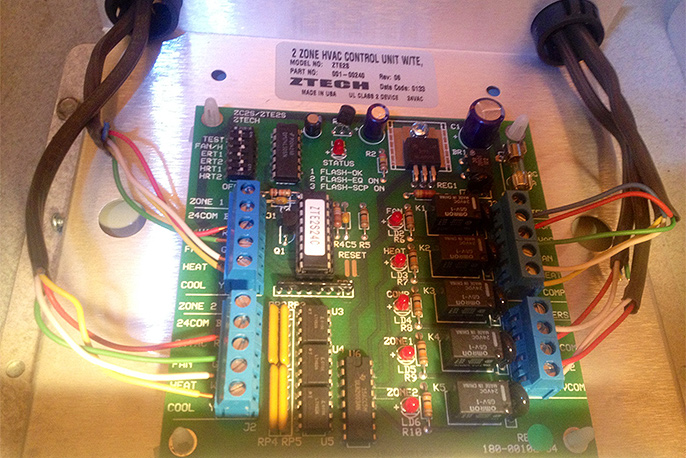
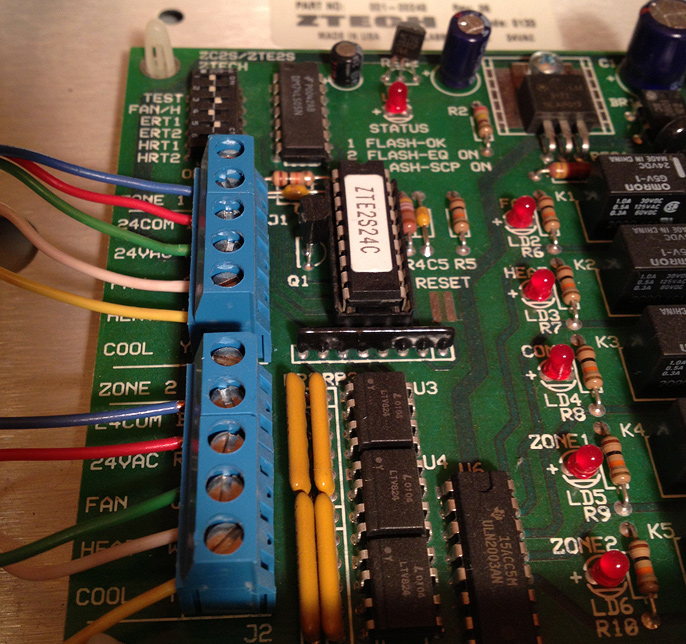
To keep the system and its veritable wall of hard drives running cool and trouble-free, large fans were employed in conjunction with a simple, off-the-shelf fan controller which combines the feedback from multiple fans into one monitoring port, complete with overheating alarm and adjustable temperature settings (via jumpers).

For completeness, a SCSI card and stealth serial port were added, leaving room for ProTools PCI audio cards. In its day, this was a screaming system that bested even Apple’s top PowerMac offerings, and would still make for a fairly respectable server today. Someone clearly spent many hours getting the physical layout and electrical systems “just right”, which I thought was well worth preserving and sharing.

WordPress 2.5 Released

March 29th, 2008 11:16 am

WordPress, the publishing platform for many blogs including this very site, just hit a major milestone featuring a redesigned admin interface, instant plugin upgrades, vastly improved speed, and more.

The new administration system now sports a minimalist and streamlined look without skimping on the options you’ve already come to know and love. The oft-ignored Dashboard screen has been refined to a now usable level, and the Manage section has seen a nice overhaul as well. For newcomers, the controls are far less intimidating, but all the bells and whistles seasoned bloggers need are still easily within reach.

Keeping WordPress itself up to date is sometimes a hassle, but any plugins you employ also need periodic replacement. With WordPress 2.5, plugins can be upgraded right in place, though WordPress itself continues to only notify you of available updates. Still, the feature is a very nice touch for those who use several plugins like the spam-defending marvel that is Akismet, Google Sitemaps, and so on.

From a reader’s perspective, the new version offers improved speed. One of my biggest gripes about WordPress is how it tends to buckle under a heavy load, and it appears that the new version will be able to dispatch content to visitors’ browsers much faster than before, reducing the workload when under stress from a Digg or Slashdot stampede to a particularly popular post.

Overall, WordPress 2.5 is a highly recommended upgrade for anyone currently operating a blog, and a must-have for those of you still on the fence. What are you waiting for? Get WordPress and get writing!